1095-C Form
Fill Form

1095-C Form

2025
Official IRS form
Official IRS form
Trusted by healthcare pros
Filled annually
Filled annually

1095-C Form is a tax form issued by Applicable Large Employers (ALEs) to inform their employees and the IRS about the employer-provided health insurance offer and coverage.

Open our fillable 1095-C Form in our PDF editor and enter the required information without a hassle. Afterward, you can download the document to your device or print it out to send it by mail.

1095-C Form

2025
1095-C Form
Fill Form
Official IRS form
Official IRS form
Trusted by healthcare pros
Filled annually
Filled annually

1095-C Form is a tax form issued by Applicable Large Employers (ALEs) to inform their employees and the IRS about the employer-provided health insurance offer and coverage.

Open our fillable 1095-C Form in our PDF editor and enter the required information without a hassle. Afterward, you can download the document to your device or print it out to send it by mail.

How to Fill Out an I-765 Form

Step 1: Open our IRS Form 1095-C in PDF.

Step 2: Enter information about the employee and the employer.

Step 3: Fill out the employer offer of coverage table for the entire year, as specified in Form 1095-C instructions.

Step 4: Complete Part III of the form if the ALE Member offers employer-sponsored, self-insured health coverage.

Step 5: Review the information and download Form 1095-C to your device.

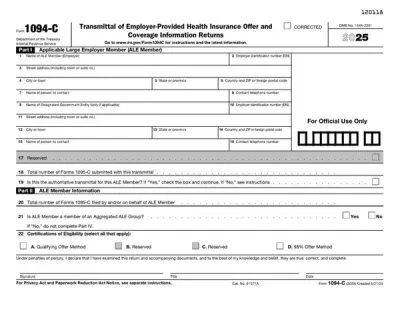
Step 6: Prepare the accompanying Form 1094-C.

What Is Form 1095-C?

Form 1095-C, also known as Employer-Provided Health Insurance Offer and Coverage, is a document detailing information about the health coverage offered to eligible employees.

Who Is Required to File Form 1095-C?

All Applicable Large Employers (ALEs) are required to file Form 1095-C with the IRS and issue a copy to each eligible employee. ALEs are companies and organizations with at least 50 full-time employees or full-time employee equivalents.

When Is Form 1095-C Due for Submission?

Form 1095-C is due for submission by the end of February if filed on paper or the end of March if sent electronically. If the due date falls on a weekend or a legal holiday, then it’s pushed to the following business day.

What Are the Penalties for Not Submitting Form 1095-C?

Under the Affordable Care Act, ALEs are required to file Form 1095-C with the IRS and furnish it to employees, and failure to do so may result in a fine. This penalty is adjusted for inflation each year, but it’s currently $340 per form.

Where Do I File Form 1095-C?

You should file Form 1095-C with the IRS, either by mail to one of the addresses provided on their website or electronically. If you are filing 10 or more forms in a year, you are required to submit them electronically.

How to Get Your Form 1095-C?

  1. Select the editable 1095-C Form
    Select the editable 1095-C Form
    1

    Select the editable 1095-C Form

  2. Fill in your information
    Fill in your information
    2

    Fill in your information

  3. Download the completed PDF tax form
    Download the completed PDF tax form
    3

    Download the completed PDF tax form

#1. How do I get a blank Form 1095-C?

You can get a blank Form 1095-C from pdf.net or directly from the IRS website. If you select it from our fillable tax forms hub, you can open it in our editor right away to begin entering the information.

#2. How often does Form 1095-C need to be filed?

Form 1095-C needs to be filed once a year for each eligible employee. It should be submitted even if an employee has worked in the company for only a month or two.

#3. What if my Form 1095-C is missing information?

If your Form 1095-C is missing information, you should contact your employer to request a corrected form. The employer should update the details and send you a new form, as well as file a corrected document with the IRS. To check whether anything is missing, compare your form with an example of Form 1095-C.

#4. Can I fill out my Form 1095-C online?

You can fill out your 1096-C online by opening the form in our PDF editor and entering the required information directly.

#5. Is this form free?

This form is free to view and edit, but you need to buy a subscription if you want to download the document to your device.

#6. Can I correct mistakes after submitting Form 1095-C?

You can correct mistakes after submitting Form 1095-C by filing a new form and checking the “CORRECTED” box at the top. Furthermore, you should send a Form 1094-C with the corrected document, as it’s necessary for the transmittal of Form 1095-C.