IRS Form 1099-C is used to report canceled or forgiven debt of $600 or more to the IRS.
As a lender, use our fillable Form 1099-C, and input all the necessary information online, download the form, and submit it to the IRS and debtor.



IRS Form 1099-C is used to report canceled or forgiven debt of $600 or more to the IRS.
As a lender, use our fillable Form 1099-C, and input all the necessary information online, download the form, and submit it to the IRS and debtor.
Form 1099-C is used to report canceled or forgiven debt of $600 or more. Lenders and financial institutions issue this form to notify both the IRS and the debtor that a debt obligation was discharged and may be taxable income.
Creditors, lenders, financial institutions, and certain businesses use Form 1099-C when canceling qualifying debt. Debtors who receive the form should review it carefully and include the information when preparing their federal tax return if required.
Also, debtors who qualify for an exclusion, such as insolvency or bankruptcy, should complete Form 982, Reduction of Tax Attributes Due to Discharge of Indebtedness, to report the excluded amount on their tax return.
Form 1099-C due date is February 28th if filing by mail or March 31st for electronic filing. If the filing deadline falls on a weekend or federal holiday, submissions are generally considered on time if filed on the next business day. However, Form 1099-C copies must be furnished to debtors by January 31st.
If Form 1099-C is not submitted on time or contains incorrect information, the issuer may face IRS penalties and compliance issues. Missing filings can also create tax reporting problems for debtors and may lead to IRS notices, delayed processing, or additional review.
Form 1099-C can be filed electronically through IRS-approved e-filing systems or by mail. If you’re submitting 10 or more returns during the tax year, you’re generally required to e-file with the IRS.
 1
1 2
2 3
3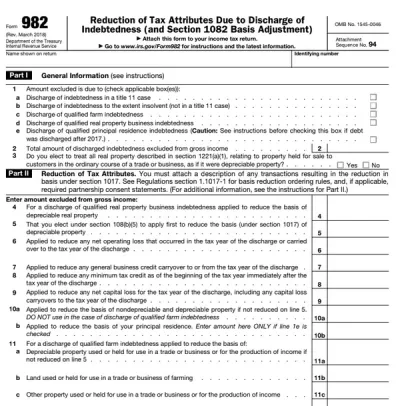

You can get a blank Form 1099-C either from the IRS website or pdf.net. Regardless, you can fill it out online with our PDF editor.
Yes, you can submit Form 1099-C electronically through IRS-approved filing systems. Electronic filing is required for filers submitting 10 or more returns during the tax year. Also, it is often faster than mailing paper forms.
If your Form 1099-C is missing information, contact the issuer as soon as possible to request a corrected copy. Missing details such as TIN, canceled debt amounts, or dates may cause filing issues or delays. Don’t forget to review the Form 1099-C instructions carefully to avoid leaving out information.
Yes, you can fill out your Form 1099-C online by using pdf.net. Our online editor works across devices as long as you have reliable Internet. Open it on any browser and complete it directly.
This form is free to open and edit. However, you will need to sign up for an account to download it. Visit our pricing page for more details.
Yes, you can correct mistakes on your Form 1099-C by filing an updated or corrected form with the IRS. Cross-check with a Form 1099-C example to ensure you are not making additional errors. Review names, TIN, canceled debt amounts, and dates carefully before submitting.
How long it takes to process a Form 1099-C depends on the filing method and IRS workload. Electronically filed forms are typically processed faster, while mailed submissions may take several weeks, especially during peak tax filing periods.
How badly a 1099-C affects your taxes depends on the amount of canceled debt and your financial situation. Form 1099-C may increase your taxable income, which could increase the taxes you owe unless you qualify for certain IRS exclusions or exceptions (e.g., insolvency, bankruptcy, etc.).
Yes, as a lender, you have to file Form 1099-C, Cancellation of Debt, when $600 or more of debt is canceled or forgiven.