Form 1094-C
Fill Form

Form 1094-C

2025
Official IRS form
Official IRS form
Trusted by HR managers
Monthly top‑searched
Filled annually
Filled annually

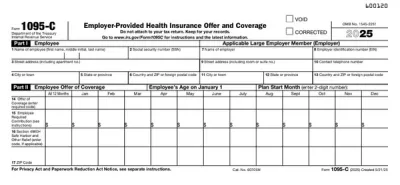
Form 1094-C (Transmittal of Employer-Provided Health Insurance Offer and Coverage Information Return) is a cover sheet for Form 1095-C, which Applicable Large Employers (ALEs) must submit to the IRS to report health insurance coverage offered to their employees.

Fill out Form 1094-C online easily. Just type the required information directly into the empty slots and download the document when you’re finished.

Form 1094-C

2025
Form 1094-C
Fill Form
Official IRS form
Official IRS form
Trusted by HR managers
Monthly top‑searched
Filled annually
Filled annually

Form 1094-C (Transmittal of Employer-Provided Health Insurance Offer and Coverage Information Return) is a cover sheet for Form 1095-C, which Applicable Large Employers (ALEs) must submit to the IRS to report health insurance coverage offered to their employees.

Fill out Form 1094-C online easily. Just type the required information directly into the empty slots and download the document when you’re finished.

How to Fill Out Form 1094-C

  1. Open Form 1094-C in our PDF editor.
  2. Fill out the details about the ALE member (name, address, EIN).
  3. Add the total number of Forms 1095-C that you’re submitting.
  4. Complete the coverage summary for each month according to the Form 1094-C instructions.
  5. Fill out Part IV only if you’re a member of an aggregated ALE group.
  6. Submit the document along with Forms 1095-C.

What Is Form 1094-C Used For?

Form 1094-C is used for summarizing and transmitting Forms 1095-C, which ALEs must submit to the IRS to comply with the provisions of the Affordable Care Act. Essentially, they must report information about health coverage offered to their employees.

Who Should Use Form 1094-C?

Form 1094-C is used by Applicable Large Employers, which are people or entities that employ more than 50 full-time employees or their equivalents. ALEs are required to fill out Forms 1095-C for each employee, and the only way to transmit these to the IRS is by using Form 1094-C.

When Is Form 1094-C Due?

Form 1094-C is due on February 28th if filing by mail, or March 31st if filing electronically. Both of these deadlines can be pushed to the next business day if they fall on a weekend or a national holiday.

Furthermore, you can request an automatic 30-day extension by submitting Form 8809, but make sure to do that before or on the deadline.

What Happens If Form 1094-C Is Not Submitted?

If Form 1094-C isn’t submitted, you may be subject to a failure to file a correct information return penalty of $340 for each return, up to a maximum of $4,098,500. Keep in mind that any Forms 1095-C you file without Form 1094-C won’t be valid and might result in additional penalties.

How and Where Do I File Form 1094-C?

You should file Form 1094-C with the IRS using the addresses provided on the official website or electronically through the official service. If you’re required to file 10 or more information returns in a single year, you are required to do so electronically, though you can request a waiver if necessary.

How to Get Your Form 1094-C

  1. Open the editable Form 1094-C
    Open the editable Form 1094-C
    1

    Open the editable Form 1094-C

  2. Enter the required information
    Enter the required information
    2

    Enter the required information

  3. Download Form 1094-C to your device
    Download Form 1094-C to your device
    3

    Download Form 1094-C to your device

#1. How do I get a blank Form 1094-C?

You can get a blank Form 1094-C from pdf.net or the official IRS website. Both can be easily opened in our PDF editor and filled out in a couple of clicks.

#2. Can I submit the Form 1094-C electronically?

Yes, you can submit Form 1094-C electronically. In fact, you’re required to do so if filing more than 10 information returns in a year. However, even if you’re not, you’re encouraged to do so, as the processing is faster.

#3. What if my Form 1094-C is missing information?

If your Form 1094-C is missing information, you should file a properly completed one as soon as possible to avoid potential penalties. You can do this by submitting a new form and ticking the “CORRECTED” box in the corner. Keep in mind that this is only done for Forms 1094-C that you designate as Authoritative Transmittal.

To ensure there are no issues or processing delays, use an official Form 1094-C example as guidance.

#4. Can I fill out my Form 1094-C online?

Yes, you can fill out your Form 1094-C online with our PDF editor, which allows you to type the information directly into the blank fields.

#5. Is this form free?

This form is free to view and edit, but to download it, you’ll need an active subscription plan. Check out the pricing page for more information.

#6. Can I correct mistakes on Form 1094-C?

Yes, you can correct mistakes on Form 1094-C by taking the steps described for missing information. If you’ve found an error only on Form 1094-C, you don’t need to submit the accompanying Forms 1095-C.

#7. How long does it take to process Form 1094-C?

There’s no specific information on how long it takes to process Form 1094-C, as it is a summary and transmittal form for information returns. In other words, you won’t get any feedback on it if everything is completed correctly.

#8. What is the difference between Forms 1094-C and 1095-C?

The difference between Forms 1094-C and 1095-C is that the former is a summary and transmittal form for the latter. While 1095-C must be issued for each employee, 1094-C is only submitted to the IRS when sending associated Forms 1095-C.