#1. How do I get a blank CMS-1500 form?
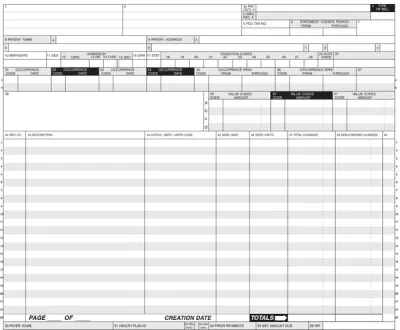
You can get a blank CMS-1500 Form from pdf.net, insurance provider websites, or medical billing software. Wherever you find it, you can easily open it in our PDF editor to fill it out before submission.
#2. How many boxes are in the CMS-1500 form?
The CMS-1500 Form has 33 numbered boxes, where you should enter patient, provider, and service information. Some boxes have subsections too, so the form may take some time to complete.
#3. Can I submit a CMS-1500 form electronically instead of on paper?
Yes, you can submit a CMS-1500 Form electronically instead of on paper; in fact, it’s obligatory to do so in some cases. You should check the insurer’s website to learn more about their requirements.
#4. What if my CMS-1500 form is missing information?
If your Form CMS-1500 is missing information, it’s likely going to be rejected and considered unprocessable. In that case, you’ll need to submit a new form, which will result in delayed payments. To avoid that, compare your document to a full Form CMS-1500 example to make sure nothing is out of place.
#5. Can I fill out my CMS-1500 form online?
You can fill out your Form CMS-1500 online by using our PDF editor, which allows you to enter information directly into the empty fields on the document.
#6. Is this form free?
This form is free to view and edit, but you will not be able to download it without a subscription.
#7. Can I correct mistakes on the CMS-1500 form?
You can correct mistakes on Form CMS-1500 by submitting an updated document and adding the required information to box 22. That way, you’ll let the insurer know you’re resubmitting the form.