

Redact PDF and permanently black out sensitive information
Cover names, account numbers, signatures, photos, or whole pages. What’s under the box is removed from the file, so no one can copy it back out.
또는
PDF, DOC, DOCX, PPT, PPTX, PPSX, XLS, XLSX, JPG, PNG, HEIC, HEIF 지원
파일은 비공개로 유지됩니다
Adobe was giving me a hard time and I found this website and I was able to get my tasks acomplished.

Jesus TorresTrustpilot 리뷰 (영어 번역)
Redact documents before you send them
All of it runs in the browser. Nothing to install, nothing to switch to.
Apply for an apartment or a loan
Landlords and lenders ask for bank statements, pay stubs, and tax returns. Keep the income they need to see and redact account numbers and unrelated transactions.Prepare court filings and discovery
Black out client names, case numbers, and account details before a filing goes out. The court and the other side see only what they need.Review resumes without names
Remove names, photos, and home addresses from resumes, so the hiring team reads the experience first.Answer public records requests
Release a report or a letter and redact the personal details of people who aren’t part of the request.Send invoices to a client or an auditor
Show the work and the totals, and redact bank details, rates, or signatures the other side doesn’t need.Remove photos and ID numbers from scans
Draw a box over a face, an ID, or a signature on a scan, and the image under it is removed.


A black box isn’t a redaction
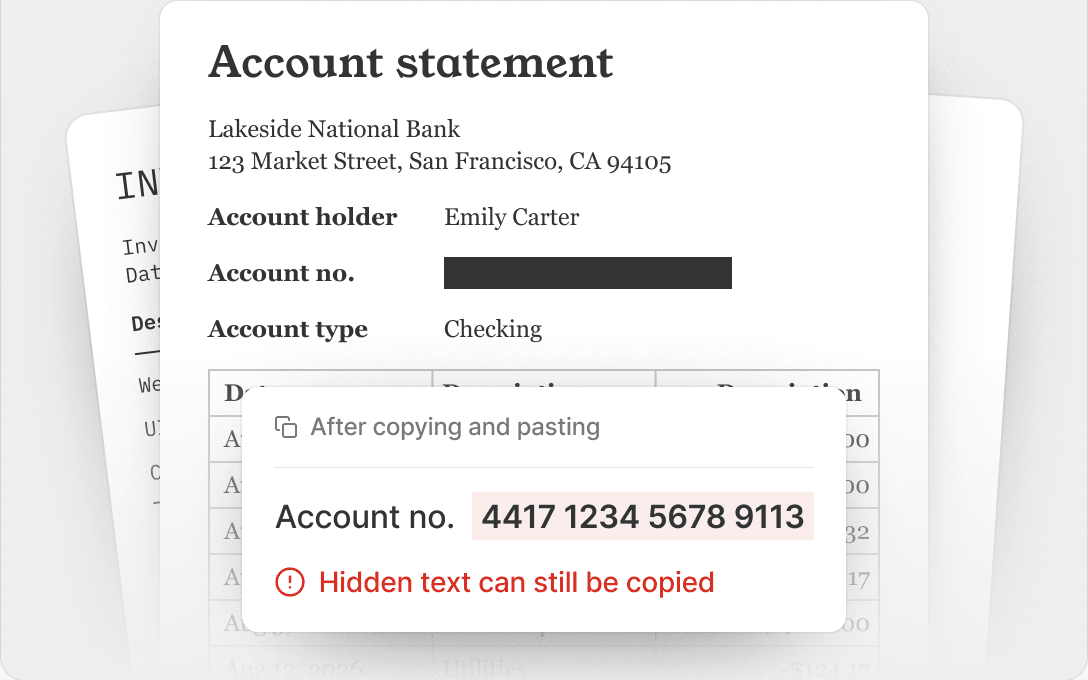
Covering text with a shape hides it on screen. The text is still in the file, and anyone can copy it.
Covered with a shape
Select the box, copy, and paste it anywhere. The account number is still there.
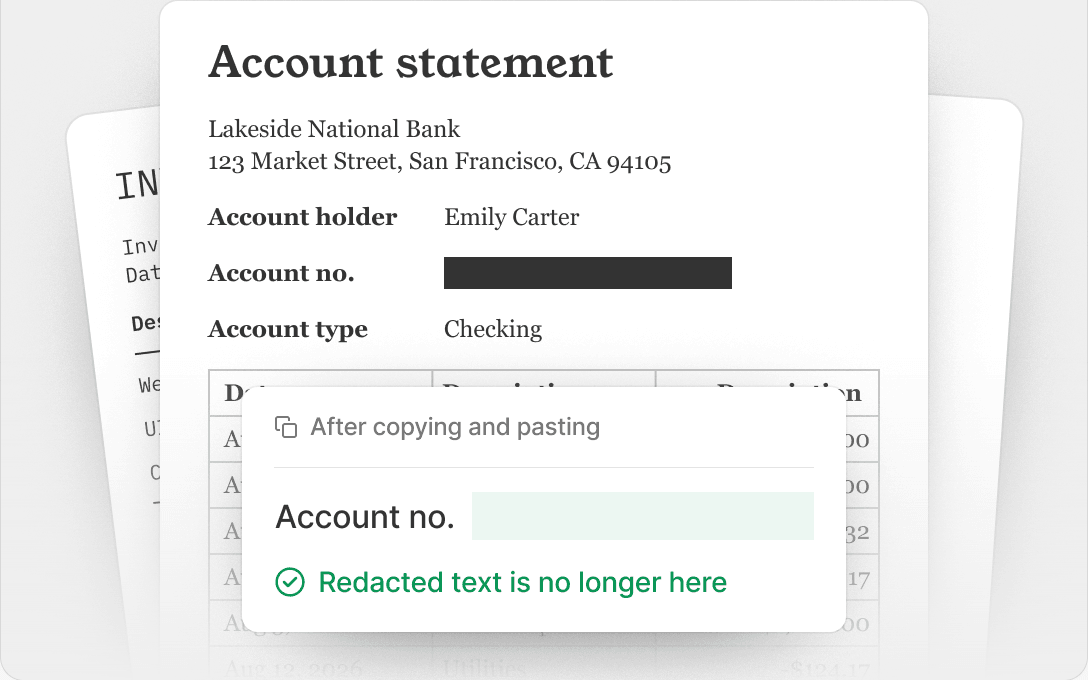
Redacted in pdf.net
The text and images under the box are removed from the file. They can’t be selected, searched, or recovered.
파일은 비공개로 유지됩니다
한곳에서 제공되는 모든 PDF 도구
설치 없음, 앱 전환 없음 — 모든 기기에서 작동


기타 도구

Word를 PDF로 변환
DOC/DOCX를 PDF로 변환하세요. 서식을 유지할 수 있습니다.

JPG를 PDF로 변환
JPEG 사진을 품질 손실 없이 하나의 PDF 파일로 병합하세요.

PNG를 PDF로 변환
여러 PNG 이미지를 하나의 PDF로 결합하세요. 해상도가 유지됩니다.

PDF를 JPG로 변환
PDF 페이지를 각각의 JPEG 이미지로 변환하세요. 공유하거나 업로드하도록 준비할 수 있습니다.

PDF Excel 변환
PDF 표를 Excel 또는 Google Sheets에서 바로 사용할 수 있는 편집 가능한 스프레드시트로 변환하세요.

PDF를 PNG로 변환
PDF 페이지를 각각의 PNG로 분할하세요. 전체 해상도가 유지됩니다.

Markdown을 PDF로 변환
.md 파일을 붙여넣거나 업로드하고 몇 초 만에 서식이 적용된 PDF를 받으세요. 표와 코드 블록도 포함됩니다.

Excel을 PDF로 변환
XLS 및 XLSX를 깔끔하고 공유하기 쉬운 PDF로 변환하세요. 서식은 그대로 유지됩니다.

PDF CSV 변환
PDF에서 표 데이터를 추출해 스프레드시트와 데이터 분석에 바로 사용할 수 있는 깔끔한 CSV 파일로 만드세요.

PDF를 PowerPoint로 변환
편집 가능한 PPT 및 PPTX 슬라이드를 가져오세요. 글꼴과 레이아웃을 유지할 수 있습니다.

HEIC를 PDF로 변환
iPhone HEIC 사진을 공유 가능한 PDF로 바꾸세요. 모든 기기에서 열 수 있습니다.

PowerPoint를 PDF로 변환
PPT 및 PPTX를 공유 준비가 된 PDF로 변환하세요. 모든 기기에서 열 수 있습니다.

은행 거래 내역 Excel로 변환
PDF 은행 거래 내역을 회계 및 분석용 편집 가능 Excel 또는 CSV 파일로 변환하세요.

EPUB를 PDF로 변환
EPUB 전자책을 인쇄용 PDF로 변환하세요. 모든 기기에서 열 수 있습니다.

PDF를 Markdown으로 변환
PDF를 깔끔한 MD 텍스트로 변환하여 메모, 문서 또는 리포지토리에 바로 사용할 수 있습니다.

Convert PDF to Text
Get the text from your PDF as a .txt file. Copy it into emails, documents, or notes.

압축
3가지 압축 수준으로 PDF 파일 크기를 줄이세요.

Compare PDF
Spot every change between two PDFs. View side by side or overlay.

이미지 추가
PDF에 로고, 사진, 그래픽을 추가하세요. 크기와 위치를 조정할 수 있습니다.

파일 분할
PDF를 여러 파일로 분할하세요. 분할할 페이지를 자유롭게 선택할 수 있습니다.

페이지 재정렬
드래그 앤 드롭으로 재정렬하세요. 페이지를 삭제, 복제, 회전할 수 있습니다.

페이지 번호 추가
페이지 번호를 자동으로 매기세요. 위치, 형식, 여백을 선택할 수 있습니다.

주석 추가
PDF에 마크업 추가: 그리기, 강조 표시, 지우기. 다양한 색상과 선 두께 지원.

페이지 회전
PDF 방향을 쉽게 조정하세요. 한 페이지, 여러 페이지 또는 전체 페이지를 선택할 수 있습니다.

Bates 번호 매기기
Bates 번호를 자동으로 추가하세요. 접두사, 접미사, 번호 매기기 스타일을 선택할 수 있습니다.

페이지 추출
필요한 페이지를 선택하고 새 PDF로 저장하세요.

PDF 작성 가능하게 만들기
텍스트 필드, 체크박스 및 서명을 추가하세요. 평면 양식과 스캔한 양식 모두에서 작동합니다.

Add Watermark to PDF
Mark PDF pages with your text or an image

서명 요청
누구에게나 PDF를 보내 PDF 서명을 요청하세요. 서명할 위치를 표시하고 이메일로 초대할 수 있습니다. 서명된 문서를 돌려받으세요.

서명 배경 제거
흰색 상자 없이 PDF에 서명할 수 있도록 서명을 투명하게 만드세요.

Signature Generator
Type, draw, or upload your signature. Save and reuse it across documents.

PDF와 채팅
AI에게 PDF에 관한 무엇이든 물어보세요.

PDF 요약 생성기
AI로 PDF의 핵심 요점을 요약하세요.

PDF 생성
필요한 문서에 대해 설명하고 서식이 지정된 PDF를 받으세요.

AI 양식 작성기
가지고 있는 양식과 문서를 업로드하세요. AI가 필드를 입력해 줍니다.

PDF 공유
몇 초 만에 보안 링크 또는 이메일로 PDF를 업로드하고 공유하세요. 누가 보거나 편집할 수 있는지 제어하세요.
How to redact a PDF
 1
1Upload your document
 2
2Select text, images, or whole pages
 3
3Apply the redaction and download your PDF
Ready when you are.
사용자들이 pdf.net을 선호하는 이유
일상적으로 사용하기 쉽고 간편함
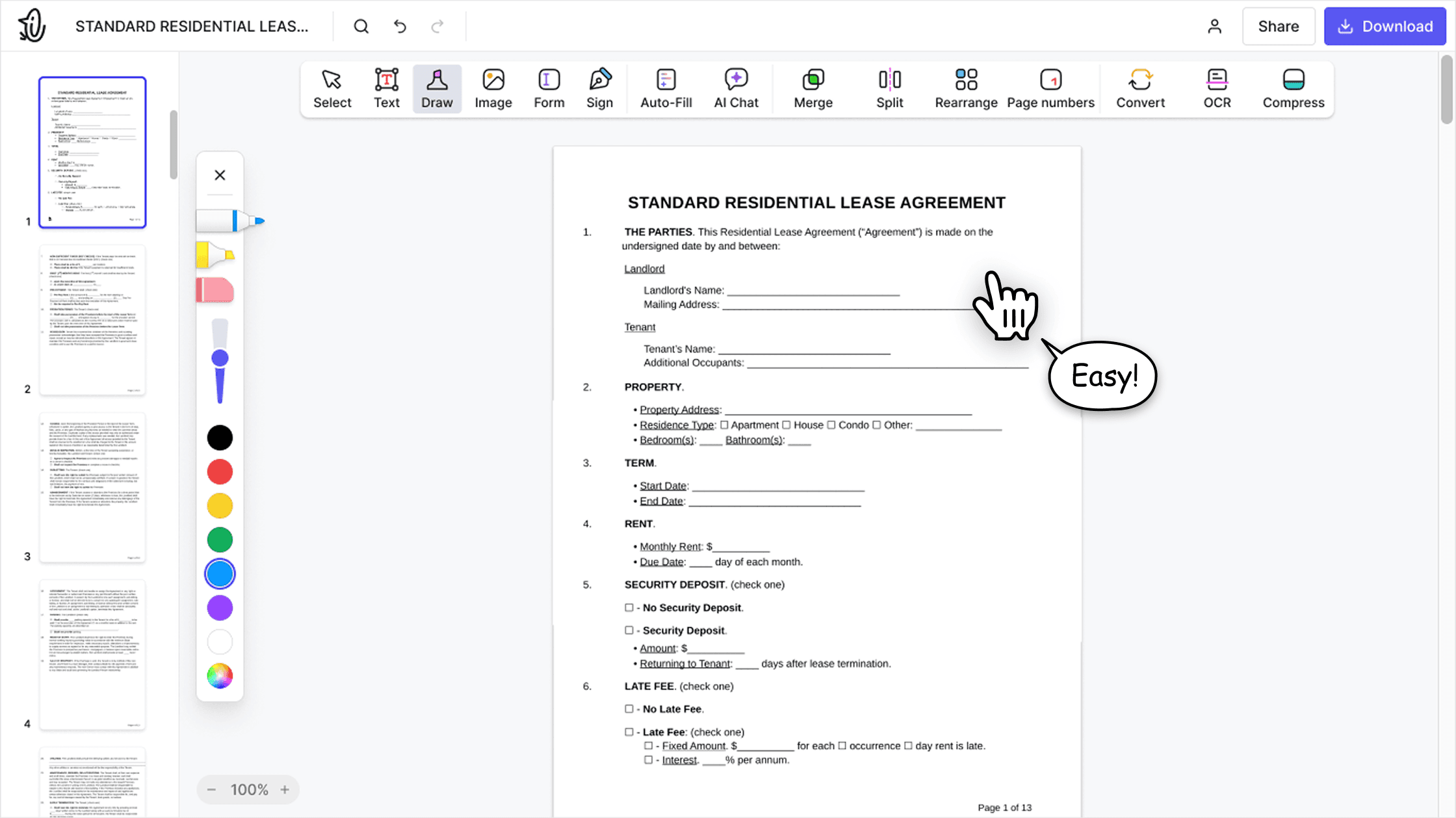
온라인 PDF 편집기는 초보자와 전문가 모두를 위해 설계된 깔끔하고 직관적이며 사용하기 쉬운 인터페이스를 제공합니다. 처음 사용하더라도 쉽게 탐색하고 PDF 파일을 편집할 수 있습니다.

올인원 PDF 편집기
당사의 편집기는 문서를 사용자 지정하고, 병합하고, 서명하는 등 다양한 작업을 할 수 있는 강력하고 포괄적인 기능 세트를 제공합니다. 더 이상 여러 애플리케이션 간에 파일을 전송할 필요가 없습니다.

문제 없이 서식 유지
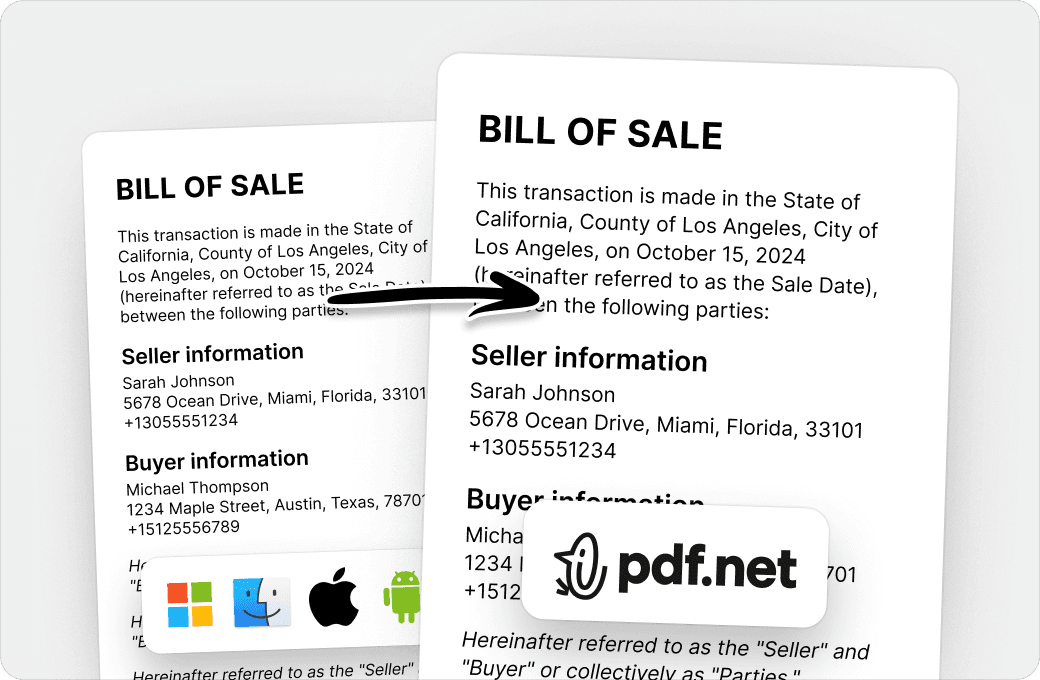
여러 시스템이나 기기에서 문서가 엉망이 되거나 서식이 일관되지 않는 문제가 더 이상 없습니다. 온라인 PDF 편집기는 크로스플랫폼 호환을 지원하며, PC, MacOS, 스마트폰, 태블릿 중 어떤 기기를 사용하든 일관성을 유지합니다.
전 세계 사람들이 문서 편집을 위해 pdf.net을 신뢰합니다
Very easy to use, and the conversion is highly accurate.


AnthonyTrustpilot 리뷰 (영어 번역)
Very easy to use, and the conversion is highly accurate.
AnthonyTrustpilot 리뷰 (영어 번역)
not complicated - i have no mouse to write signatures so this way helps

Patricia DelgadilloTrustpilot 리뷰 (영어 번역)
특히 양식 작성에 유용한 매우 다양한 도구 세트.

이미 가지고 있는 파일로 다양한 유형의 파일을 만드는 데 유용합니다. 변환하기만 하면 됩니다!

momscareTrustpilot 리뷰 (영어 번역)
Try it on a sample first
Not ready to upload a real contract?
Open our sample document in the editor, redact it yourself, and see the result before you use your own file.
파일은 비공개로 유지됩니다
자주 묻는 질문
- What does it mean to redact a PDF?
- Redacting a PDF means permanently removing sensitive content, such as names, numbers, images, or whole pages, and showing a black box in its place. Unlike a shape drawn over the text, a redaction deletes the content from the file, so no one can read, copy, or search it.
- How do I redact a PDF?
- Choose your file and it opens in the editor. Select the text you want to hide, draw a box over any image or area, then apply the redaction and download your PDF.
- Can a redaction be removed?
- No. Once you apply a redaction in pdf.net, the content under the box is deleted from the file. It can’t be recovered, even with other PDF software.
- How do I black out text in PDF files?
- Select the text and apply a redaction. pdf.net replaces it with a black box and removes the text itself. If you only draw a black rectangle over text, the text stays in the file and anyone can copy it from under the shape.
- Can I redact images and whole pages?
- Yes. Draw a box over a photo, a signature, or part of a scanned page to remove it, or redact an entire page at once.
- Can I redact a PDF without Adobe Acrobat Pro?
- Yes. pdf.net is an online PDF redaction tool that works in your browser on Windows, Mac, and mobile, so you don’t need Acrobat Pro, Preview, or any other installed software.
- Is blurring text the same as redacting it?
- No. A blur, a highlight, or a black shape only changes how the page looks, and the text underneath stays in the file. Our PDF redactor removes the text, so there is nothing left to uncover.
- Is this tool free?
- This tool is free to access and to redact PDF files. However, to download your new document, you need to subscribe to our services.
- Is it safe to upload sensitive documents?
- Yes. Uploading your documents to pdf.net is safe and secure. Our online PDF editor uses secure HTTPS encryption and advanced safety protocols to keep your documents private and protected. We run on Google Cloud infrastructure with strict access controls.
- What file formats are supported?
- You can upload PDF, DOC, DOCX, PPT, PPTX, PPSX, XLS, XLSX, JPG, PNG, HEIC, and HEIF files. Your file opens in the editor, where you can redact it and download it as a PDF.
- Can I redact a PDF on my phone?
- Yes. pdf.net works in your mobile browser, so you can redact a PDF on an iPhone, an Android phone, or a tablet without installing an app.